
Find Anything Faster on Your Phone
Have you ever spent too much time scrolling through your phone trying to find something? Maybe an app, a contact, or a message? It happens to all of us.
Here’s an easier way: let your phone do the searching for you.
Most smartphones have a search tool built right in — you just have to know where to look.
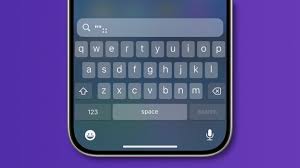
On an iPhone, place your finger in the middle of your screen and gently swipe down. A search box will appear at the top of the screen with a small magnifying glass icon and the word Search.
On many Android phones, you may already see a search bar at the top of your screen. If not, try swiping up to see your apps — there is often a search box at the top there too, also marked with a magnifying glass.
Once you see the search box, simply tap it and start typing.
You can type:
- The name of an app (like “Photos” or “Weather”)
- A person’s name
- Even a word from a message
Your phone will start showing results right away — often before you finish typing.
You don’t need to type the whole word. Just a few letters usually works.
✨ Gadget Gal Tip: Look for the magnifying glass symbol — that’s the universal sign for “search” on almost every phone.

Author: Pam Overly
Digital and Media Manager for New Westsiders (NWS). I moved to Avon Lake from Overland Park, Kansas, in 2013 and joined NWS later that year. I’ve served on the board as Historian and President and have also chaired several interest groups.